Social Campaign Plays Out in Election

Today I may become more active on Facebook and Twitter. For the past few weeks, I have not been active on either because I was tired of the political posts and the ads. No place was safe. Several friends posted requests urging other friends to stop sharing their political rants.

How social was the election this year? According to ABC News, in 2008 there were 3 million people on Twitter. For this election there were 70 million people on Twitter who tweeted 358 million times about the election!

Words that gained attention included Big Bird and binders. Word clouds were dominated by hope, pride and relief.

Social media allowed candidates to spread their messages to larger audiences and reach a younger demographic. The platforms also encouraged voters to get out and vote and to “stay in line” during yesterday’s long lines throughout the country.

I had tried to vote in the morning but the wait was an hour, and I had meetings to attend. By mid-afternoon I had received tweets and a text message telling me the line was short. I headed out to vote.

Throughout the evening, I watched the coverage until it was time for my volleyball matches. In between games, I checked the results online.

Thanks to social media – and the campaign issues — this was an election that engaged a nation.

What Is Your Favorite App?

The other week I was visiting a smartphone kiosk and mentioned that I dislike carrying around all the cards to get discounts from various vendors. Next thing I knew I was addicted to the Key Ring app, which brings all the cards together on my phone. I can scan and store all of my existing loyalty cards (I have a ton!). I can even find ones that I might be missing. I’ve had a few glitches, but overall, I love not carrying all those cards. Or worse, leaving one at home!

That led me to wonder what friends and colleagues would say are their favorites. Here are a few that scored high:

Grocery IQ: I don’t like grocery shopping so when a colleague told me about this one, I couldn’t wait to try it out. With this app you can make grocery lists, check off items as you pick them up in the store and set favorite products. You can even customize the aisle for each store you shop.

Myfitnesspal: Another colleague told me about this one, which allows you to keep up with your exercise and food eaten during the day.  It lets you know how many calories you should take in and when you are over or under. Even better, if I have exercised, it lets you have more calories!

GasBuddy: If you drive a lot, this is the app for you. It allows you to check gas station prices and where the deals are in different cities. It also tells you how far to the next gas station. NFPW member Teri Ehreman used it when she was scoping places for next year’s post-tour trip.

Waze: This is another great app if you are on the road frequently or just can’t stand traffic. As the site says, Waze is a “fun, community-based GPS traffic and navigation app.” Drivers report what is happening and you get turn-by-turn navigation that re-routes as road conditions change.

DirecTV: NFPW Member Gwen Larson likes this app because she’s often running from the office to her son’s athletic event and will realize she’s forgotten to DVR a newscast with which she did an interview. With this app, she can set the recordings directly from her phone.

What are your favorite apps and why?

5 Steps to Start a Blog

Have you been thinking about starting a blog, but you’re not sure how to get started? Well, stop thinking about it and do it. If you’re like me, though, you need a few steps to get started so here are five to move you forward.
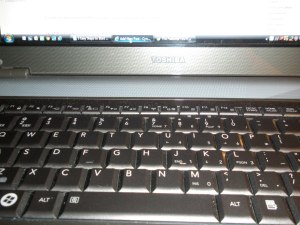
Computer keyboard

The key to writing a blog is to stop thinking about it and write it. (Photo by Cynthia Price)

Choose your topic. You can write about anything you want to write about but if you want a following try to narrow your focus. I started my blog as a way to communicate with members of National Federation of Press Women. I’m exposed to lots of information through conferences, training, list serves and business books, and I realized I could distill the nuggets from these sources so that others wouldn’t have to do the research. That’s my blog – Cynthia’s Communique.

Choose a platform.  I set up mine on WordPress because at the time that is what I was most familiar. I also like how easy it is for readers to post comments. Another platform is Tumblr, which is especially nice for short posts and photos. A colleague once described it as long-form Twitter. Whatever, you choose, take the time to read or watch the tutorials.

Create a content calendar. How often will you publish? Where will you find inspiration? I post every Wednesday and Sunday – it’s what works for me. During NFPW conferences, I post daily for the members who can’t attend. You may decide to post simply when you feel like it. A downside to that is that it’s challenging to grow your readership when readers don’t know when to expect a post.

I also keep a running list of ideas. I note key holidays and events that might be relevant for a blog topic. Sometimes I’m able to create evergreen posts that don’t have a time limit but I can use when I might be too busy. These are especially helpful for when I’m traveling and may not have the extra time needed to write a post. My content calendar is always with me so I can tweak it, rearrange it, add to it.

Write your blog. And then proof it and edit it. Even after you do that, you may post a mistake. Own up to it and correct it. My blog is usually a few hundred words. To get to those words, I often spend an hour or two researching my topic, interviewing people, distilling information and then putting the salient points on paper (well, on the screen). It’s a lot of work, and I must carve out time to do it. Be prepared to put in the prep work.

Market your blog. You can write a blog and post it, but that doesn’t mean anyone will see it to read it. It’s not like a baseball field in an Iowa cornfield. You need to employ SEO (search engine optimization or key words). You need to print it on your business card. You need to tweet it. You need to share it on Facebook. You need to talk about it. You should also read other blogs and write a comment if you have something relevant to share. You should link to other blogs and materials in your blog so that your readers know they’re getting something more than simply your thoughts.

These steps will move you forward. You’ll keep learning along the way, just as we all do. When you launch your blog, I hope you will send me a link so I can check it out.

(Thanks to CPW member Ann Lockhart for inspiring this blog.)

Ethical News Values Need to Remain Constant

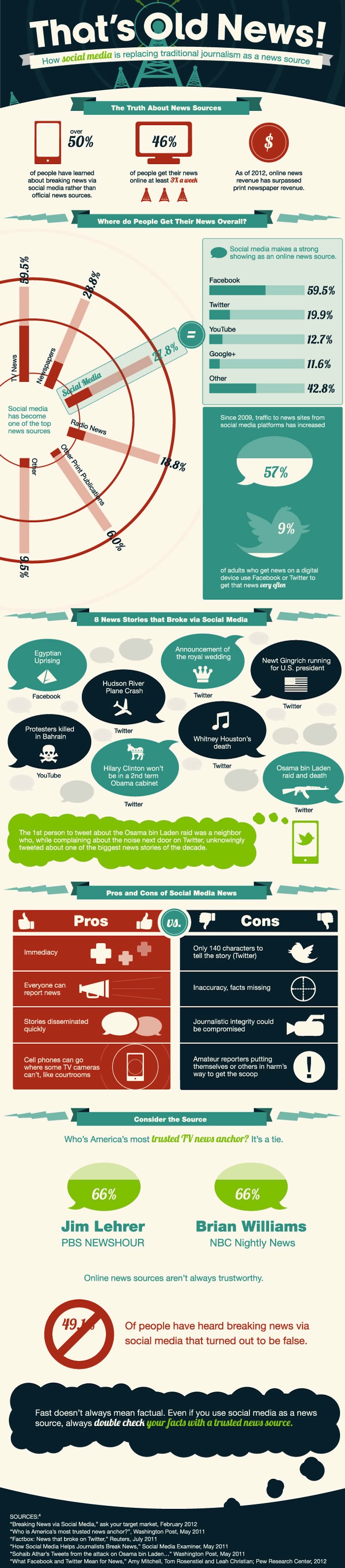
Schools.com created this infographic about how social media is replacing traditional journalism as a news source.

I still subscribe to the daily newspaper. I enjoy reading local news and getting an in-depth look at trending topics.

When it comes to getting breaking news, though, I often learn the latest on a social media site. Stories such as the Hudson River plane landing and Whitney Houston’s death broke on Twitter before they did in traditional media.

However, even when I learn of a breaking story on social media, I still need to have it confirmed by a traditional source before I believe it. That’s mainly because I’m not convinced that those who are reporting on social media sites understand news values and, more importantly, ethical news values.

For several years I taught media ethics and among the ethical news values I taught were accuracy, confirmation and sufficiency to name a few. Specifically,

Accuracy:  Journalists need to put what they report in context. They also need to use the correct facts.

Confirmation: A news article needs to withstand scrutiny inside and outside the newsroom, write Philip Patterson and Lee Wilkins in Media Ethics: Issues & Cases. The Washington Post coverage of Watergate is a classic example of stories withstanding scrutiny.

Sufficiency: Adequate resources need to be allocated to important issues. Unfortunately, with staff cutbacks, many news organizations aren’t able to do this. Reporters also should thoroughly review materials before publishing.

Our news sources may be changing, but the ethical news values should remain the same.

Curiosity Top Reason to Use QR Codes

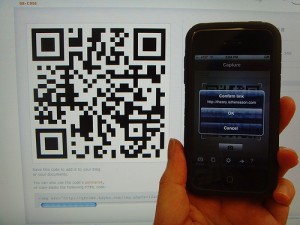
Last weekend I was planting some seeds in my garden. Believe it or not, the seed package had a QR code on it. Even more unbelievable is that I had my smart phone with me so I scanned it to see what it would take me to.

It was a site that provided information about the plant, as well as care and harvesting tips. My curiosity had gotten the best of me.

Curiosity is exactly why 46 percent of people who have used QR codes did so, according to eMarketer. Other reasons include to get more information (41%); to take advantage of a discount/coupon/ free gift (18%); to gain access to exclusive content (16%) or to buy something (6%).

Just last week I was at a store and it had a QR code on a promotional flyer. By scanning it, I received a coupon for 25 percent off one item. It was worth it!

I still don’t make it a habit of using QR codes, but they definitely have an appeal. When do you use them?