Back To School Is the Perfect Time To Organize

20170307_084141Walking into an office supply store is always an expensive endeavor for me. I can’t help myself: the pens, colored notebooks, shiny folders. They all want me to take them home. And as they say, “Resistance is futile.”

August and September are especially challenging because of back-to-school sales. I can’t help but be tempted, especially when I can find items on sale or have a coupon.

This time of year is also the perfect time to organize for the coming year. It’s always been that way for me, and now that I work at a university, my need to organize in late summer is even stronger.

Here are a few suggestions to organize your work space of office:

Corral your pens and pencils. I have one container, and if they don’t all fit, I need to get rid of some. Obviously, toss the ones that don’t write. For those that work fine but you know you will never use consider donating to a senior center or after-school program.

Clean your desktop. Remove everything from the surface of your work space and wipe it down. Don’t forget to clean the keyboard, too. It’s an amazing feeling to then begin working with a clean desk.

I also make the time to clean off my computer desktop. I’m always amazed how files accumulate. For me, it’s often laziness. It’s easy to save a file to my desktop rather than thinking about where I should logically file it for archival purposes. Knowing I frequently save to my desktop, I force myself at least once a quarter to organize my files. Once I do, I find my productivity increases. And knowing that the files are saved to the cloud or a backup device lets me sleep at night.

Shred your files. When is the last time you pulled a piece of paper from a file? If it’s been months, maybe it’s time to purge some of your files. I’m working toward having zero files. If someone gives me a paper document that I will need, I ask for it electronically or I scan it and save it on my computer. At least once a quarter I work to eliminate one or two file folders. I’m down to one small file drawer.

Order the necessary supplies. Nothing is more frustrating than discovering you have run out of sticky notes or staples. I check my supplies and order what I need for the next six months. That way you don’t run out and you don’t waste time each month placing an order. And maybe you avoid going into the office supply store and buying another notebook! (But that’s a post for another day.)

An Empty Inbox

Much has been written about how to tame one’s inbox. All of the suggestions would probably fill an inbox.

The February 2019 issue of Fast Company notes that 2.6 hours each day are spent on email, which amounts to 27 days each year.

That is a lot of time spent on email. And the topic was top of mind because as we were closing out 2018, a team member asked how the rest of us manage our inboxes. She was still wrestling with hers. We all shared our approaches, and reassured her that we, too, were still wrestling.

The takeaway for me is that one size doesn’t fit all. I use my inbox as a to do list. It works well for me. I also maintain folders, but they are for reference and filing. If I move an email into a folder without first taking action on it, I’ll likely never get back to it. I know others who move every email into a folder and then begin to take action.

For me, about 50 emails in my inbox is reasonable. More than that, and I know I am falling behind. In December just before I left the office for almost two weeks, a tiny miracle happened.

Actually, it was a huge miracle – I left with zero emails in my inbox. I was able to address everything either by handling it or scheduling it on my calendar for 2019.

What an incredible feeling. Here’s what an empty inbox looks like:

Empty Inbox.PNGOf course, within a few hours, the emails were arriving. They didn’t bother me, though, because most I could delete. And the few that remained were ready for me to handle in 2019.

Here are a few email tips to get you set for 2019:

  • Make your inbox work for you. That’s a great tip from Carson Tate, who offers a course in taming the inbox and is the author of “Work Simply: Embracing the Power of Your Personal Productivity Style.”
  • Set aside 20 minutes midweek to review your inbox to ensure that you have not overlooked any critical emails. I also delete those that require no action and offer no information.
  • Move reference emails to a retrieval system. I either file emails into clearly defined folders or I file the attachment into a World folder so I can retrieve it later.
  • Don’t reply to an email the second it arrives. You don’t want to set the expectation that you are always available. It’s important to focus on your priorities.
  • Stick to a schedule when checking and responding to email. This is advice I gleamed from Michael Smart. It resonated because he helped me to realize that emails are not my priority. They often are a means to reach my priorities – whether that is pitching a story and having it placed in a news outlet or tracking down information to write a blog post.

What tips do you have for taming your inbox?

Spring Is in the Air — Time to Clean

The winter weather seems to linger, but I still know spring is in the air. How? I’m deeply into spring cleaning – or should I say clearing – at my office.

Here’s what I’ve been doing:

Purging digitally: I’m always complaining about all the emails I receive. Many of them are lists to which I subscribed years ago. I find I never read them. Instead of simply hitting delete I now hit unsubscribe. My inbox is shrinking as a result. So is my stress.

Adjusting my clock: It’s easy for me to work later in the winter because it’s dark outside. With daylight savings time, though, it doesn’t get dark until later. Fortunately, one of my colleagues reminded me of this. I’m leaving earlier now so I can take advantage of the extra daylight. It’s nice to be home at a reasonable hour and still have time to walk the neighborhood or go to the gym. Soon, I’ll be in the garden.

20140331_185905Purging: I did something in my spring cleaning that was so liberating. I emptied all my pens and pencils into a pile and then only kept about a dozen. What did I do with the rest? I tossed them! Yes, it was wasteful, but most of them had been picked up at conferences or given to me. No one else was going to want them. And now I can use the pens I truly like.

Cleaning files: I limit myself to two file drawers. If they start to get tight, it means it’s time to toss some files. However, many of my files are now kept on my hard drive. I take the time to clean those out, too. I have a rule that every document must fit within a folder. And no folders can be labeled “Miscellaneous.”

Switching up: It’s been a year since my last spring cleaning so it was time to change the artwork and move the items on my desk. Not only did it make the office feel fresh and inviting, it stirred up some new energy.

What’s on your spring cleaning list?

Organizing for the New Year

While most people were enjoying time off at year’s end, I worked. And I didn’t mind.

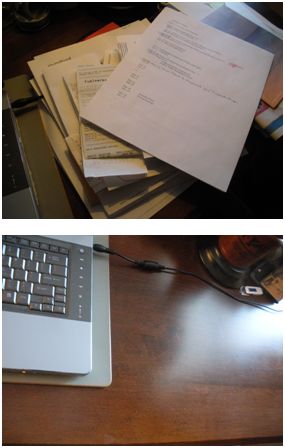
Two views of a desk -- one messy, one clean.

Most of the day was spent making the piles disappear from the office, and it was well worth the time. (Photos by Cynthia Price)

There was nary a creature stirring, which meant that I could clean out my inbox, sort through files and basically get set for the New Year. I find it helpful to do this exercise twice a year, usually in January and again in late August around back-to-school time. I do it both at home and at work.

Here are 4 tips for getting organized:

Have the necessary supplies on hand. It’s easier at work, where we have a supply closet. At home, it usually leads to a quick run to a store. Files and labels are critical. So are trash bags (more on that in # 3).

Start with the desk surface. I take everything off my desk and clean the surface. Once I do that, I don’t usually want to put everything back. I tend to only keep out the files and papers that are critical for that time. The rest are filed in a drawer. My stapler, tape dispenser and other such supplies are corralled in a desk drawer. I have an attractive container for my pens and pencils.

Open the drawers. Go through each drawer and see what you no longer need. Throw the non-essentials into the trash bag and recycle the paper. I limit myself on storage deliberately. Most of my files are electronic, which helps cut down on clutter. If I discover business cards, I enter them into my contacts online. I also connect with the person via LinkedIn. Research material that is no longer needed is discarded. My files all have a specific name. I don’t allow for a “miscellaneous” folder as that’s too easy to fill with anything and everything. I do have a folder, though, in which I can stash notes or emails for a month or two. Then I have to toss them.

Review your computer files. I know you thought you were finished, but you’re not. Electronic storage needs to be reviewed and cleaned up. If you have files that you don’t need, delete them and empty the trash. Do you have thousands of emails in your inbox? Do you really need them? Delete or archive as needed. Better yet, respond. And don’t store files on your desktop thinking it’s a short cut. Before long the desktop is cluttered.

Now you are ready for the New Year!

Time Wasters

The other week a colleague asked me how much time I slept because he thought I was one of those people who only needed a few hours. It was the only way he could figure out how I do as much as I do.

(Captured from Bejeweled)

(Captured from Bejeweled)

The truth is I need sleep, and at least 7 hours. Any less and I’m cranky and not on my game. More than eight hours, I get a headache.

My success is that I am able to prioritize and focus. But not always.

Sometimes, I trick myself and set a timer. Until the timer goes off, I have to write, or clean, or pay bills. Sometimes I buy a venti-sized coffee, extra hot, shut my door and work for hours – or at least until the coffee is gone.

When I’m not getting much done, I stop and look at how I’m spending my time. I’ve discovered I most likely could have built the Empire State building in record time. Or walked a few times across the Wall of China – at least according to the statistics for how much time people spend playing Bejeweled. I’ve contributed many hours.

Television is another time zapper, and most people know that. For me, though, getting lost in a good book can zap my time. If I really want to put off getting work done at home, I’ll delve into an extra long book and try to justify the time even though I know better.

We all need to decompress, but it’s also important to ensure that we aren’t simply wasting time or avoiding a deadline. Do you know what your time wasters are?