4 Ways to Get Involved with NFPW

I started this blog when I became president of the National Federation of Press Women. It was a means to further connect with members who are located across the country and to share on a variety of topics of interest to members. It was one of the ways I could become more involved.

How can you become involved in NFPW (or any organization for that matter)?

Enter the communications contest. It’s one of the draws for NFPW. This year the contest is online and I suspect, like others, I’ll be a bit challenged by the process. However, I’m starting early so I will have plenty of time to figure it out. I’ve judged online contents previously and it wasn’t too bad. It just took a bit of patience. One of the benefits of the contest is that judges are encouraged to write comments, which is helpful to enhance work going forward. And, of course, if you win, you can feel good about the work you’re producing. Don’t forget to tell your boss! (Editor’s Note: The deadline for state affiliates of NFPW for the online communications contest is Jan. 27.)

Serve on a committee. Not everyone has the time commitment for a board position, but you could volunteer for a committee or a one-time need such as introducing a speaker at a conference. It’s a great way to get to know other members, which can lead to enhanced networking.

Put your skills and talents to work. You could write for the website or newsletter, provide graphic support or serve as webmaster. If event planning is your thing then organize the next outing or conference. Or you could help publicize the event. Putting your skills and talents to work also allows you to build your resume.

NFPW 2014 conference logo

NFPW’s next conference is Sept. 4-6 in Greenville, S.C.

Attend conference. Speaking of conference, mark your calendars for your affiliate meetings and the national conference, which this year will be held in Greenville, S.C., Sept. 4-6. You have nine months to save for your travel expenses, find a roommate and make your arrangements. It’s a great way to learn about the latest in communications, network and see another part of the country. You may even make some lifelong friends. 
Using PowerPoint to Support Your Presentation

PowerPoint can be an effective tool in making a presentation, but only if used properly.

Presenters, though, often forget that audiences are “there to see you, not your slides,” says Richard Harrington, a digital video expert. I recently took his online course, PowerPoint: From Outline to Presentation through Lynda.com.

“Effective speaker support is the goal,” he says.

SlideShare recently discussed 2013 trends around presentations and noted the following:
·         People want short, visual content
·         They want less text, meaning show it, don’t write it, and
·         They prefer images and fonts that are big

The key to a successful presentation is to organize it through an outline. Then gather the images, videos and links, finally creating the presentation.

You can build your outline in a Word document or using the outline feature in PowerPoint. Either way, you are determining the critical elements of your presentation.

Once you have your outline, determine what visual elements you can use to illustrate your points. These elements also will serve as triggers when you are speaking. PowePoint’s job is to not be your presentation but rather to support you as you speak.

If you are new to presenting, include your notes on the notes page and then present using “Presenter View.” This allows you to view your presentation with speaker notes on your laptop or tablet, while your audience views the presentation sans notes. To do this, go to the “Slide Show” tab and in the “Monitors” group, click “Use Presenter View.”

Once you have everything prepared, be sure to practice. You want to check the timing to stay within your allotted time. Click through the slides and each item on the slides to ensure that everything is working. Also check for spelling errors.

Now you are ready to give a successful presentation. Good luck!

Organizing for the New Year

While most people were enjoying time off at year’s end, I worked. And I didn’t mind.

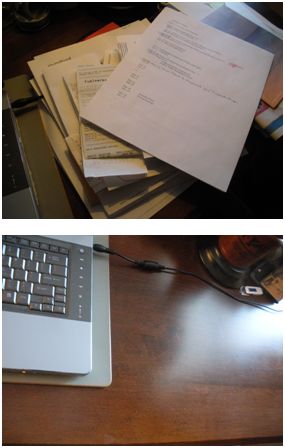
Two views of a desk -- one messy, one clean.

Most of the day was spent making the piles disappear from the office, and it was well worth the time. (Photos by Cynthia Price)

There was nary a creature stirring, which meant that I could clean out my inbox, sort through files and basically get set for the New Year. I find it helpful to do this exercise twice a year, usually in January and again in late August around back-to-school time. I do it both at home and at work.

Here are 4 tips for getting organized:

Have the necessary supplies on hand. It’s easier at work, where we have a supply closet. At home, it usually leads to a quick run to a store. Files and labels are critical. So are trash bags (more on that in # 3).

Start with the desk surface. I take everything off my desk and clean the surface. Once I do that, I don’t usually want to put everything back. I tend to only keep out the files and papers that are critical for that time. The rest are filed in a drawer. My stapler, tape dispenser and other such supplies are corralled in a desk drawer. I have an attractive container for my pens and pencils.

Open the drawers. Go through each drawer and see what you no longer need. Throw the non-essentials into the trash bag and recycle the paper. I limit myself on storage deliberately. Most of my files are electronic, which helps cut down on clutter. If I discover business cards, I enter them into my contacts online. I also connect with the person via LinkedIn. Research material that is no longer needed is discarded. My files all have a specific name. I don’t allow for a “miscellaneous” folder as that’s too easy to fill with anything and everything. I do have a folder, though, in which I can stash notes or emails for a month or two. Then I have to toss them.

Review your computer files. I know you thought you were finished, but you’re not. Electronic storage needs to be reviewed and cleaned up. If you have files that you don’t need, delete them and empty the trash. Do you have thousands of emails in your inbox? Do you really need them? Delete or archive as needed. Better yet, respond. And don’t store files on your desktop thinking it’s a short cut. Before long the desktop is cluttered.

Now you are ready for the New Year!

New Year, New Blog Plans

I must begin this blog with an apology to my faithful readers. I was a bit (okay, a lot) slack toward the end of the year. I could make all kinds of excuses, but I won’t. For more than four years, I have published twice a week, every week.

Then one day, I missed a day. I didn’t have a blog written, and I told myself I would work on it at day’s end. I’m sure you know the rest of the story. Of course, once I missed posting that one blog (or skipped that one workout), it was easy to skip the next one.

For a brief time, I considered simply ceasing to post altogether. However, I was talking with a business partner in Ann Arbor, Michigan, who shared how much he enjoyed my posts (thanks Rick!). It was nice to hear those words, and I realized how much I do enjoying writing and posting.

(Courtesy of WordPress)

(Courtesy of WordPress)

For 2014 I’m recommitted and I’ll be working the plan. What will be different?

Preparation: Part of the reason I skipped a blog post was that I had fallen behind on my research reading. I also wasn’t writing down possible blog topics that often provide inspiration when it’s a day to post the blog.

Content Calendar: I have all of the dates mapped out through June and even ideas for each month for the second part of the year. I’ve noted when I’ll be attending conferences and workshops that might provide inspiration. And the pile of books that I threaten to read will be great blog fodder once I finish them – now that’s inspiration.

Switching Days: I realized that posting on Sundays and Wednesdays was not working for me so I’m switching to Tuesdays and Thursdays. I hope that will be good for my readers who are seeking inspiration at work. For me, it means a weekend to research, write, edit and reflect, and still meet my deadlines.

Creativity: When I was shooting a photo a day, I often shot photos that would illustrate blogs. Sometimes the very act of shooting a photo led to a creative idea. Since I ceased that project, I often have no photos to accompany the blog, yet studies show that images are processed in the brain 60,000 times faster than text.

So, I’m back, and I hope I made the right decision. Let me know what you think about the Tuesday/Thursday schedule or any topics you’d like me to cover. I’ll do my best.

And thanks for sticking with me!